

If you share links on Instagram, you have probably asked yourself this question at least once: How to See Who Clicks on Your Instagram Link? Many creators, bloggers, and business owners want to understand how to see who clicks on their Instagram link so they can measure audience interest and improve their online marketing.
Every time someone taps your link, it shows curiosity. It means they want to learn more about your blog, product, video, or website. However, the platform itself does not make this information fully visible.
The good news is that you can still track Instagram link clicks, measure engagement, and analyze traffic sources using several built-in tools and external analytics platforms.
In this complete guide, you will learn:
- Whether you can see exactly who clicks your Instagram link
- How to find link clicks on Instagram
- How to track link clicks on Instagram bio and stories
- Whether someone can see if you open their link
- Tools that help track clicks more accurately
Let’s explore everything step by step.
- How to Find Link Clicks on Instagram
- How to See Link Clicks on Instagram Bio
- How to See Link Clicks on Instagram Story
- How to See How Many People Clicked Your Link on Instagram Story
- Can You See Who Clicked Your Link on Instagram Story
- How to See Who Clicks on Your Instagram Link Android
- Advanced Tracking with Link Analytics Tools
- When You Send an Instagram Link Does It Show Your Account
- Can Someone See if You Click on Their VSCO Link on Instagram
- Tips to Increase Instagram Link Clicks
- Final Thoughts
- Frequently Asked Questions (FAQ)
How to Find Link Clicks on Instagram
Before using advanced tools, it is important to understand how to find link clicks on Instagram using the built-in analytics system.
The analytics feature inside Instagram is called Instagram Insights. This tool is available for creator accounts and business accounts.
Instagram Insights helps you measure:
- Website taps
- Profile visits
- Content interactions
- Reach and impressions
These metrics help you understand how many people clicked your link after seeing your profile or content.
The following infographic:
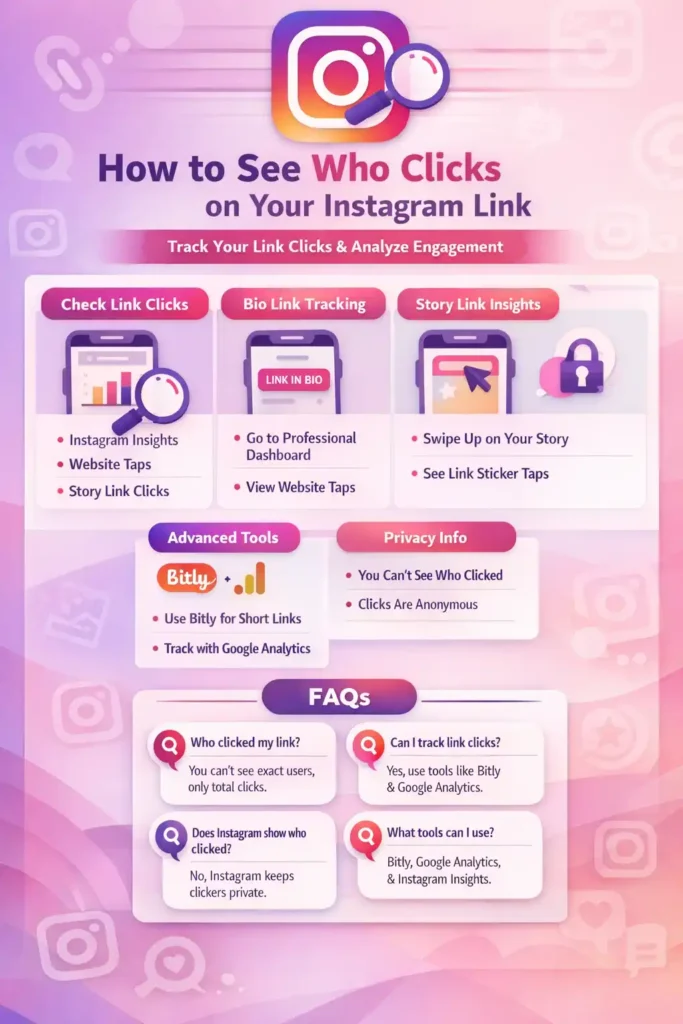
A Simple Real-Life Example
Imagine you run a small tech blog. One day, you post a reel reviewing a new smartphone. In the caption, you write:
“Read the full review through the link in bio.”
Later that evening, you open Instagram Insights and see 120 website taps.
That means 120 users clicked your link after seeing your post. Even though you cannot see their usernames, you now know which content is driving traffic to your website.
How to See Link Clicks on Instagram Bio
Most Instagram users place their main website link in the profile bio. Learning how to see link clicks on Instagram bio is one of the easiest ways to measure engagement.
Step-by-Step Guide
- Open your profile in Instagram
- Tap Professional Dashboard
- Select Insights
- Go to Accounts Reached
Inside this section you will find Website Taps.
This number represents how many users clicked the link in your Instagram bio.
For example:
- Profile visits → 900
- Website taps → 180
This means 180 people clicked your bio link.
Many creators also use tools like Linktree to add multiple links and track which one receives the most clicks.
How to See Link Clicks on Instagram Story
Instagram Stories are another powerful way to share links. With the link sticker feature, users can tap a link directly from a story.
If you want to learn how to see link clicks on Instagram story, Instagram provides this data inside the Story Insights panel.
Steps to Check Story Link Clicks
- Open your Instagram Story
- Swipe up on the story
- View the Insights panel
Here you can see several metrics, including:
- Story views
- Replies
- Link sticker taps
The link sticker taps number shows how many people clicked the link in your story.
Stories often generate strong engagement because they appear at the top of the app and feel more personal.
How to See How Many People Clicked Your Link on Instagram Story
Many users specifically want to know how to see how many people clicked your link on Instagram story.
To check this information, simply look at the Link Sticker Taps metric in your story analytics.
For example:
- Story views → 1,000
- Link sticker taps → 75
This means 75 people clicked the link from your story.
Influencers and businesses frequently use story links to promote:
- Blog posts
- Product pages
- YouTube videos
- Limited-time offers
Because stories are short and direct, they often create quick bursts of traffic.
Can You See Who Clicked Your Link on Instagram Story
Another common question is: Can you see who clicked your link on Instagram story?
The answer is no.
While Instagram shows the number of clicks, it does not reveal the usernames of people who tapped the link.
You can still see:
- Who viewed your story
- The total number of link taps
However, Instagram protects user privacy and does not show individual link click identities.
How to See Who Clicks on Your Instagram Link Android
Many people search specifically for how to see who clicks your Instagram link on Android.
The good news is that the process works the same way on Android and iPhone devices.
Steps for Android Users
- Open the Instagram app
- Tap your profile icon
- Select Professional Dashboard
- Tap Insights
Here you will see metrics like:
- Website taps
- Story link clicks
- Profile interactions
These insights help Android users track Instagram engagement and link performance.
Advanced Tracking with Link Analytics Tools
If you want deeper analytics beyond Instagram Insights, you can use external tools.
One of the most popular link tracking tools is Bitly.
Bitly shortens your link and provides analytics such as:
- Number of clicks
- Click time
- User location
- Traffic sources
For example, if you replace your normal bio link with a Bitly link, you can track exactly how many people clicked it and when.
Another powerful tool is Google Analytics.
Google Analytics allows website owners to analyze:
- Instagram referral traffic
- Page visits
- User behavior
- Conversion rates
Businesses often use this tool to understand how Instagram contributes to their website traffic and sales.
When You Send an Instagram Link Does It Show Your Account
Many users also wonder: when you send an Instagram link does it show your account?
Generally, no.
If you send someone a link to an Instagram post, profile, or reel, the platform does not notify the creator that you opened the link.
However, your account may appear in certain situations:
- If you like the post
- If you leave a comment
- If you view an Instagram story
Simply opening a shared link does not reveal your identity.
Can Someone See if You Click on Their VSCO Link on Instagram
Some Instagram users add links to creative platforms like VSCO in their bio.
Many people ask: Can someone see if you click on their VSCO link on Instagram?
In most cases, no.
VSCO may track general engagement statistics, but it does not show the exact identity of people who click profile links.
This means you can view a VSCO profile through Instagram without the creator knowing exactly who clicked it.
Tips to Increase Instagram Link Clicks
Tracking clicks is important, but increasing them is even more valuable. Here are a few proven strategies.
Use a Clear Call-to-Action
Tell people exactly what to do.
Examples include:
- “Read the full guide in the link in bio.”
- “Click the link to see today’s discount.”
- “Visit the website link for more tips.”
A strong call-to-action often increases click-through rates.
Share Valuable Content
People click links when they believe they will learn something useful. Tutorials, guides, and reviews often perform well.
Post at the Right Time
Tools like Hootsuite and Sprout Social help analyze when your audience is most active. Posting during peak times can increase link clicks.
Just like you can’t see exactly who clicks your link, Instagram also doesn’t show who saved your post—it only shows the total number, not the names.
Final Thoughts
Understanding how to see who clicks on your Instagram link is essential for creators, bloggers, and businesses who want to grow their online presence.
While Instagram does not reveal the identity of individual users who click your link, you can still track valuable data using tools such as:
- Instagram Insights
- Bitly
- Google Analytics
- Linktree
By analyzing this information, you can discover what content drives clicks, improve your strategy, and turn your Instagram audience into website visitors, subscribers, and customers.
Start tracking your links today—because your next Instagram link click could become your next loyal customer or reader.
Frequently Asked Questions (FAQ)
How do you see who clicked on your link on Instagram?
Many people want to know exactly who clicked their Instagram link, but the platform does not provide that level of detail. On Instagram, you cannot see the names or usernames of people who click the link in your bio or stories.
However, if you have a professional account, you can use Instagram Insights to see how many people clicked your link. This feature shows metrics such as website taps, profile visits, and story link clicks.
So while you cannot see the person who clicked, you can still see how many people interacted with your link, which helps you understand how well your content is performing.
Can someone tell who clicked on their Instagram links?
No, Instagram does not show the identity of people who click links. The platform focuses on protecting user privacy, so it only provides general analytics.
For example, if someone adds a link in their bio or story, they can see how many clicks the link received, but they cannot see which specific users clicked it.
Some creators use tools like Bitly or Google Analytics to track link performance. These tools can show details such as total clicks, location of visitors, and traffic sources, but they still do not reveal personal identities.
How do I see who clicks on a link?
In most cases, you cannot see the exact person who clicked a link unless the platform specifically provides that information. On Instagram, you can only see the number of link clicks, not the usernames.
To monitor link activity, you can use analytics tools such as:
Instagram Insights for basic Instagram data
Bitly for tracking link clicks and timing
Google Analytics to track visitors who arrive on your website
These tools help you understand how many people clicked your link and where the traffic came from, which is often enough to measure the success of a post or campaign.
Can you track link clicks?
Yes, you can absolutely track link clicks, and many businesses do this to measure marketing performance.
There are several ways to do it:
Instagram analytics – shows website taps and story link clicks
Link tracking tools like Bitly – provide detailed click statistics
Website analytics tools like Google Analytics – track visitors coming from Instagram
For example, if you share a blog link on Instagram and use a Bitly tracking link, you can see how many people clicked the link, when they clicked it, and sometimes their general location.
Tracking link clicks helps creators and businesses understand which content attracts the most interest, allowing them to improve their strategy and grow their audience.